
Blog / 22 May 2026
Best AI Tools for Financial Modeling
Wall Street Prep tested AI agents on a realistic financial modeling task. We added Primer, then used AI judges to score the actual workbook artifacts side by side.
Wall Street Prep did something commendable. They evaluated AI agents for financial modeling on something realistic. Not a simple unit test. A proper analyst task. As such, the results are difficult to assess deterministically, so they had actual analysts manually judge them.
I loved the idea, and took it a step further: have AI agents assess that very task.
What I learned:
- Optimize for AI comfort, not human comfort: Excel may not be the best programming language for modeling.
- Relative scoring unlocks judgement: AI can act as judge, but give it all candidates side by side.
- How do you assess feel? The next research area is whether AI can tell you how it feels to use a tool.
Set-up: a realistic task
Build a fully integrated, three-statement financial model in Excel for Apple using investment banking formatting and best practices. Show three years of historical results and four years of forecasts. Use the company's latest 10-K and Q4 press release for historical data and consensus estimates for forecasts. Insert comments and cite sources for both historical data and assumptions. Lay out the assumptions and three financial statements on one worksheet, with supporting schedules on separate worksheets as needed, and include a sources worksheet with links.
This is the ask. It is not equity research, as it asks the agent to use consensus rather than reason over forecast drivers. But overall, it is a decent technical task.
Contenders
- Shortcut AI
- ChatGPT
- Claude in Excel
Kudos to WSP: all Excel models are available for download on their article page, so anyone can take a look.
New entry: Primer
We did a lot of work on modeling at Primer, so I wanted to put it to the test. However, Primer does not model in Excel.
Tangent: why not Excel?
The original contenders are creating and manipulating Excel files directly. With Primer, I took a different approach to modelling. I think it works better.
The issue with Excel
Excel is effectively a low-code tool. It was designed for humans rather than optimized for efficiency. The way formulas work, the way cells work, everything is meant to make it easy for a human to interact with. AI agents change that. In fact, the Excel language can become an impediment.
There is evidence of agents being strong at SQL and generally using tools to perform tasks effectively. Braintrust has good research on this that is worth reading.
Give the agent the right tools
So I gave Primer tools designed specifically for modelling. Tools to work with a database, with deterministic work taken off the agent's plate. The agent can focus on the key modeling choices, inspect formula health, get hints when something is not resolving, and keep moving.
This has been a step-change in our modeling. Better yet, we can convert it deterministically to Excel afterwards. If of interest, I will write about it in depth separately.
Bottom line: instead of forcing the agent to use a language that makes it hard to model, give it one that makes it easy.
Evaluation method
This is the key part. If real-life tasks are hard to score deterministically, you need real judges. So I automated WSP scoring using AI as a judge.
Absolute scoring
I took all the areas WSP assessed the models on and gave them to GPT 5.5 Pro, the LLM judge. The reason for using 5.5 Pro is simple: if you need judgement in evaluating, use the strongest model available. For each Excel model, I got three separate instances of GPT Pro to evaluate it, three times to mitigate variance.
Relative scoring
Absolute scoring is often not enough. Last week I interviewed a candidate for a research role. After the interview I messaged my team saying: "He is an 8/10 - strong candidate. Background is not an exact fit, but really good potential."
The next day I interviewed another candidate, and their background was a near-match with what I wanted. I went back to my team and said: "He is a 9/10, but on that basis yesterday's candidate was more like a 7/10."
It is a bit simplistic, but it is tough to evaluate anything in isolation unless there is a ground truth to compare against with deterministic criteria.
Translated to evals: the models needed to be assessed together by the same LLM judge. Comparing them side by side, ranking them, and explaining the choices. Again, this was done by GPT 5.5 Pro, three times.
Caveat
The WSP eval is from February, so the Primer model had more up-to-date data. Judges were instructed to ignore data-availability differences.
Give the judge the right tools
I uploaded the Excels as queryable database representations and gave the judge tools to explore them using SQL, a language it is comfortable with.
It could inspect sheet maps, cell values, formulas, formats, comments and calculated-value diagnostics. This worked better than dumping whole workbooks into the judge's context.
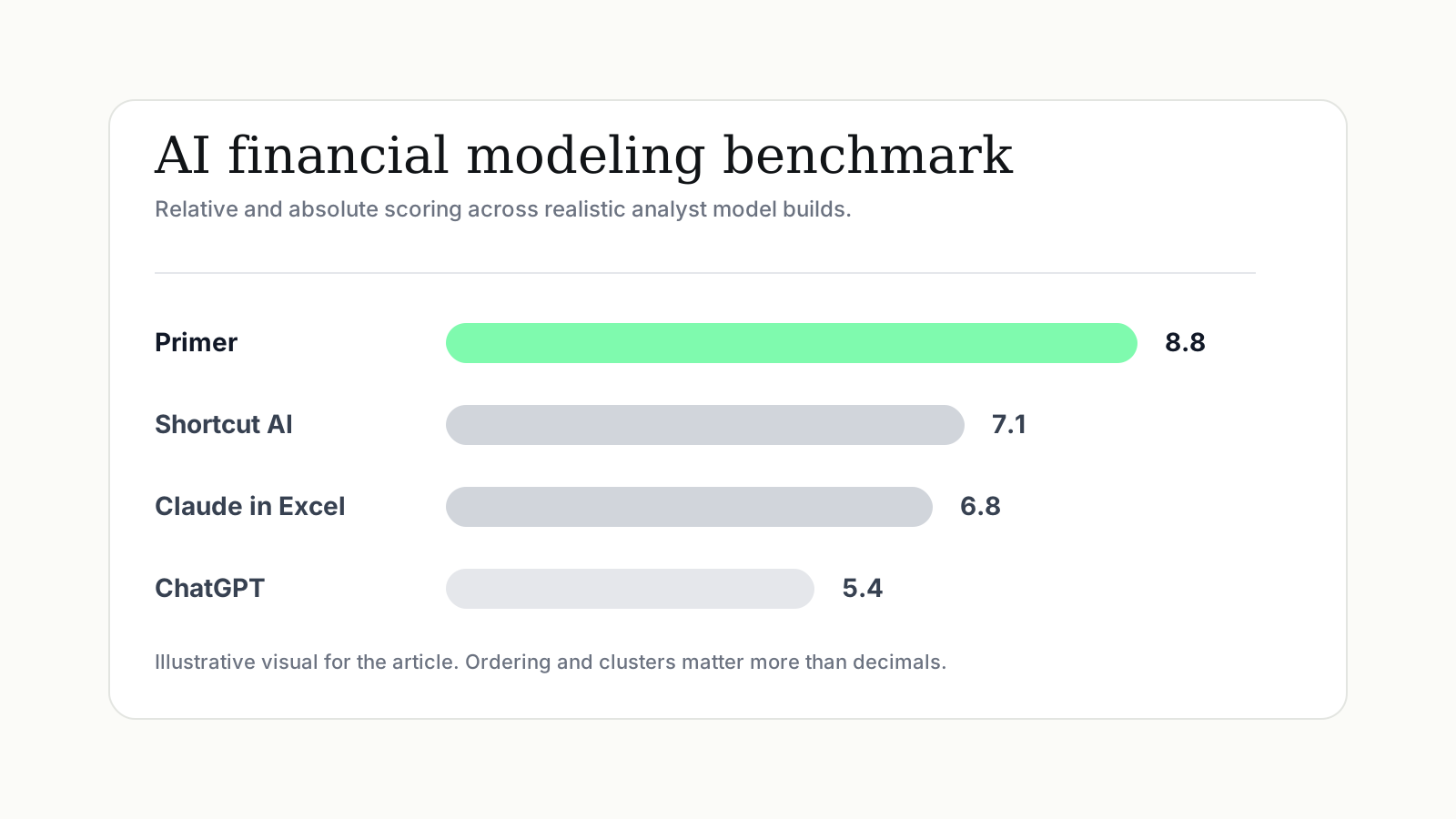
Final results
Interestingly, the ranking was similar to WSP's, but with some differences.
For the headline score, I averaged the two judges:
- 50% absolute score: how good is this model on its own?
- 50% relative score: how does it rank when compared side by side with the others?
I would not over-read the decimal points. The point is the ordering and the clusters.
Overall: Primer was materially ahead, Shortcut and Claude were close, and ChatGPT / Copilot were weaker.
Primer won because the model was more integrated. Assumptions flowed through the statements, the links were easier to audit, and the judge found fewer places where the model was being forced to balance.
Shortcut and Claude were in the middle. Shortcut looked more like a real working model: more formulas, more linked flow, and stronger model mechanics. But it also had problems: some historical cash flow items did not tie, and other current assets was effectively used as a balancing line. Claude was cleaner and easier to review, which helped its absolute score, but had thinner modelling: weaker debt, cash and interest logic, with equity doing too much work to make the balance sheet balance.
ChatGPT and Copilot were weaker for different reasons. ChatGPT had decent sourcing and presentation, but the workbook mechanics were not robust: hardcoding, formula issues and plugs. Copilot had even more missing pieces, especially around comments, source support, EPS/share logic and statement integration.
The encouraging thing is that the AI judge inspected the actual workbook artifacts, traced formulas, looked for plugs, checked statement integration, and penalized models that only looked complete on the surface.
How does it feel?
One big piece is missing: feel.
What I could not replicate with AI scoring was how using each app felt. This will be possible, especially given recent improvements in app and browser use, but it is not yet something I have given much thought to.
Conclusion
It was a fun process, and I now have a repeatable system to evaluate financial modelling. But there are shortcomings too: the WSP models were from February, so they are a couple months out of date, which in AI-land is years. We are due a refresher.
It would be fantastic to do this again with WSP and include Primer. Happy to give access any time.
Primer's model is attached for transparency. You can download the other candidates on WSP's blog page.